Documentation Index Fetch the complete documentation index at: https://prismeai-docs-next.mintlify.app/llms.txt
Use this file to discover all available pages before exploring further.
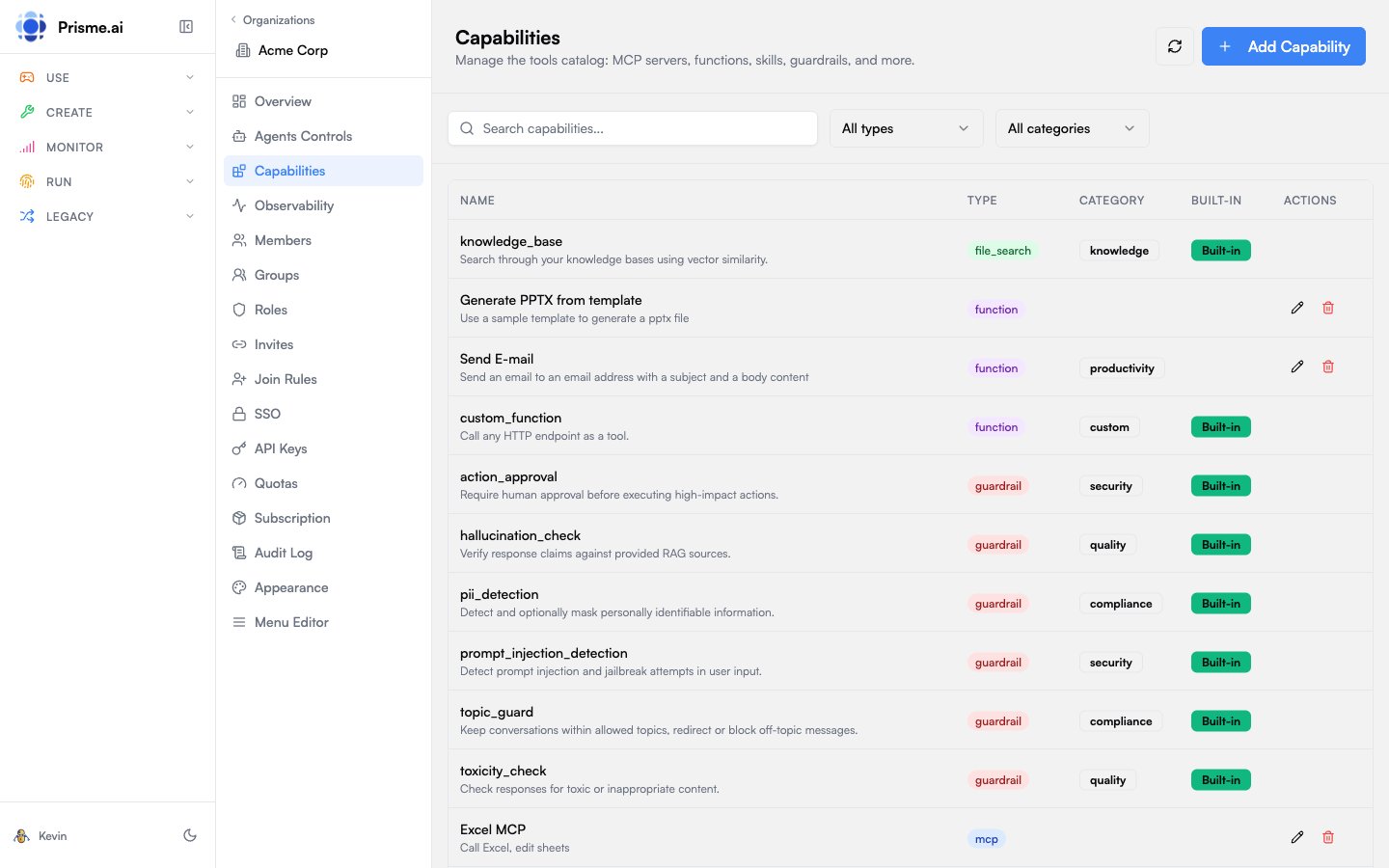
The Capabilities Catalog is a centralized registry of tools and capabilities available to AI agents in your organization. It includes MCP servers, functions, file search, skills, guardrails, memory providers, and sub-agents.
Capability Types
Type Description MCP Model Context Protocol servers providing tools via SSE/WebSocket Function Custom HTTP endpoints callable as tools File Search Knowledge base search using vector stores Skill Reusable instruction sets for agents Guardrail Input/output validation and safety filters Memory Conversation and long-term memory providers Sub-Agent Other agents that can be invoked as tools
Categories
Organize capabilities into functional categories:
Category Use Case Search Web search, document search, RAG Productivity Calendar, email, task management Security Authentication, authorization checks Compliance PII detection, content filtering Knowledge Knowledge bases, documentation Custom Organization-specific tools Store App store integrations Generic General-purpose utilities Context Context injection and enrichment
MCP Servers
Model Context Protocol (MCP) servers expose tools to AI agents through a standardized interface.
Adding an MCP Server
Go to Capabilities in the sidebar
Click Add Capability
Select type MCP
Configure:
Field Description Entry Name Display name for this server Server Name Identifier used in tool calls SSE/WebSocket URL Server endpoint URL Auth Headers Authentication headers (JSON) Scope Access scope (org, user)
Click Create
Example Configuration
{
"name" : "company-tools" ,
"server" : "https://mcp.acme.com/sse" ,
"headers" : {
"Authorization" : "Bearer {{secrets.MCP_TOKEN}}"
},
"scope" : "org"
}
Functions
Functions are custom HTTP endpoints that agents can call as tools.
Adding a Function
Click Add Capability
Select type Function
Configure:
Field Description Function Name Name used in tool calls Description What the function does Endpoint URL HTTP endpoint to call Parameters JSON Schema defining input parameters HTTP Headers Headers to include in requests
Example Configuration
{
"name" : "lookup_customer" ,
"description" : "Look up customer information by ID" ,
"url" : "https://api.acme.com/customers/lookup" ,
"parameters" : {
"type" : "object" ,
"properties" : {
"customer_id" : {
"type" : "string" ,
"description" : "Customer ID to look up"
}
},
"required" : [ "customer_id" ]
}
}
File Search
Connect vector stores for knowledge base search.
Adding File Search
Click Add Capability
Select type File Search
Configure:
Field Description Tool Name Usually knowledge_base Vector Store ID ID of the vector store to search
File search integrates with Knowledges vector stores.
Skills
Skills are reusable instruction sets that modify agent behavior.
Adding a Skill
Click Add Capability
Select type Skill
Configure:
Field Description Skill Name Identifier for the skill Short Purpose One-sentence description Instructions Detailed instructions (Markdown)
Example Skill
Name : summarize
Purpose : Summarize long documents into key points
Instructions :
When asked to summarize content:
1. Read the entire document first
2. Identify the main thesis or purpose
3. Extract 3-5 key points
4. Present as a bulleted list
5. Keep summary under 200 words
Guardrails
Guardrails validate inputs, outputs, or actions to ensure safety and compliance.
Guardrail Types
Type When Applied Input Before processing user messages Output Before returning responses to users Action Before executing tool calls
Adding a Guardrail
Click Add Capability
Select type Guardrail
Configure:
Field Description Guardrail Name Identifier Guardrail Type input, output, or action Description What the guardrail checks Endpoint URL Validation endpoint
Example Guardrail
{
"name" : "pii_filter" ,
"guardrail_type" : "output" ,
"description" : "Detect and redact PII in responses" ,
"url" : "https://guardrails.acme.com/pii-check"
}
Memory Providers
Memory providers store conversation history and long-term context.
Adding Memory
Click Add Capability
Select type Memory
Configure:
Field Description Memory Name Identifier Memory Type conversation, long_term, etc.Description What this memory stores
Sub-Agents
Sub-agents are other agents that can be invoked as tools, enabling agent composition.
Adding a Sub-Agent
Click Add Capability
Select type Sub-Agent
Configure:
Field Description Agent Select from published agents Name Override display name (optional) Description What this agent does
Built-in vs Custom
Capabilities are marked as:
Built-in : Provided by the platform, cannot be edited or deleted
Custom : Created by your organization, fully editable
Filtering & Search
Use the toolbar to find capabilities:
Search : Filter by name or description
Type : Filter by capability type (MCP, Function, etc.)
Category : Filter by functional category
Best Practices
Descriptive Names Use clear, action-oriented names for tools
Secure Authentication Store credentials in secrets, reference as {{secrets.KEY}}
Document Parameters Provide detailed descriptions in JSON Schema
Test Before Deploy Verify capabilities work before enabling for all agents
Next Steps
Model Governance Control which models agents can use
Observability Monitor capability usage and errors