> ## Documentation Index
> Fetch the complete documentation index at: https://prismeai-docs-next.mintlify.site/llms.txt
> Use this file to discover all available pages before exploring further.
# Overview
> Discover Insights, the intelligent platform for conversation analysis and quality monitoring
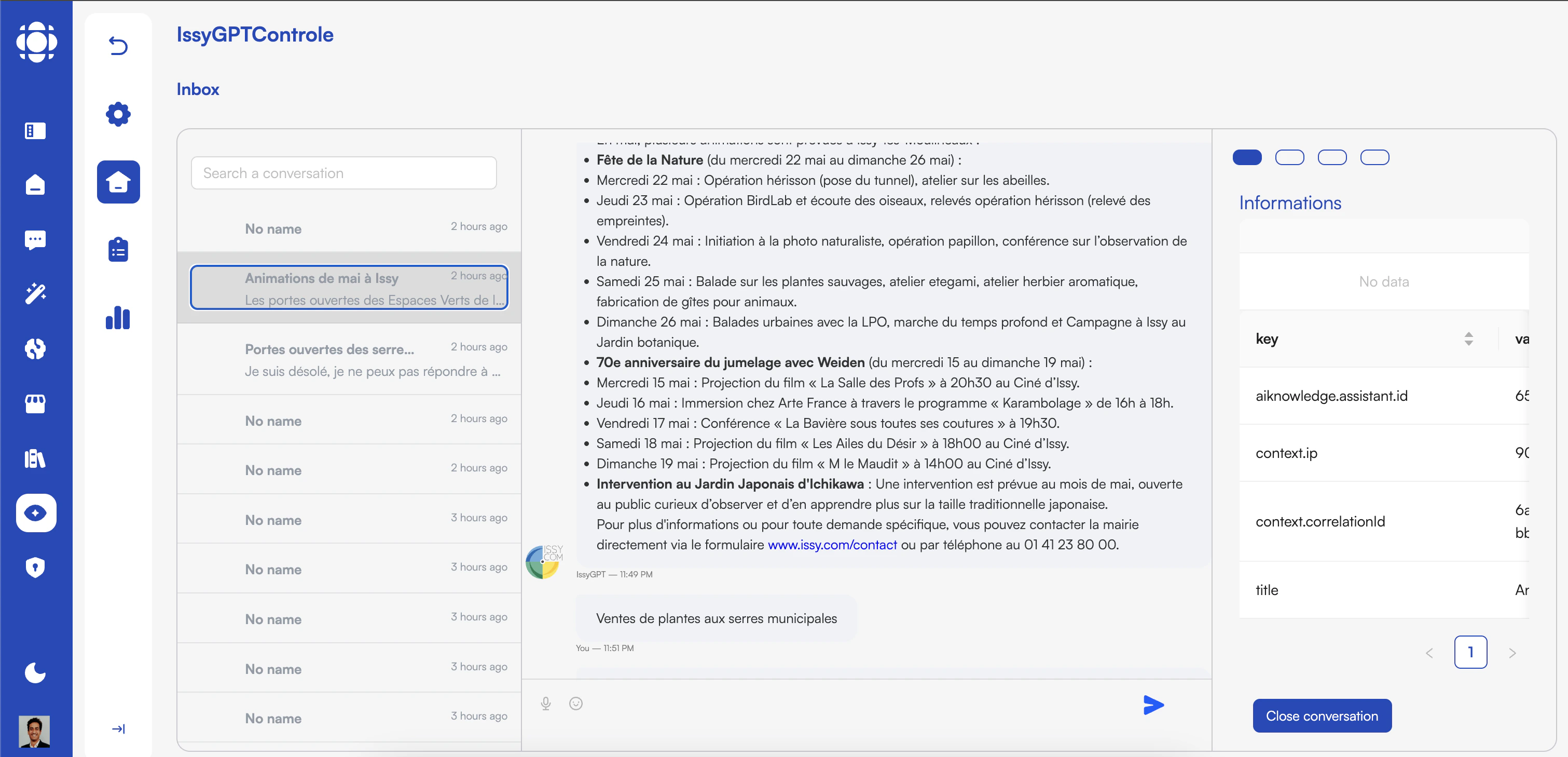 Insights is Prisme.ai's enterprise-grade conversation analysis platform that enables organizations to extract valuable intelligence from interactions between agents and humans. Whether analyzing AI assistant conversations, customer service interactions, or recorded calls, Insights provides powerful evaluation tools within a secure, compliant framework.
## Key Features
Analyze conversations from multiple sources and formats
Define and apply tailored evaluation frameworks to conversations
Apply AI-powered continuous monitoring with LLM-as-judge capabilities
Facilitate manual reviews with intelligent sampling for high-volume scenarios
Built-in tools for regulatory compliance and governance
Generate detailed reports and improvement recommendations
Tools to evaluate and optimize token usage for cost efficiency
Connect with other Prisme.ai products for comprehensive AI governance
## Who Uses Insights?
Insights is designed for diverse teams across organizations who need to monitor, evaluate, and improve conversational interactions.
AI governance teams use Insights to:
* Monitor AI assistant performance and compliance
* Identify potential risks and biases in AI responses
* Track improvements over time with consistent metrics
* Enforce organizational policies for AI usage
CX teams use Insights to:
* Evaluate customer service conversations across channels
* Identify training opportunities for human agents
* Discover recurring customer issues and pain points
* Measure and improve customer satisfaction metrics
Compliance teams use Insights to:
* Ensure adherence to industry regulations
* Monitor for sensitive information handling
* Generate audit-ready reports
* Implement compliant review processes
Product teams use Insights to:
* Understand how users interact with AI features
* Identify improvement opportunities for AI assistants
* Measure the impact of product changes
* Gather user feedback and feature requests
## Core Capabilities
### Conversation Ingestion
Insights provides multiple options for bringing conversation data into the platform:
* Direct integration with Knowledges and Chat
* Import customer service transcripts from multiple channels
* Process recorded calls with automatic transcription
* Support for chat logs, emails, and messaging platforms
* Automatic metadata extraction and organization
### Custom Evaluation Frameworks
Define and apply tailored evaluation criteria to your conversations:
* Create custom evaluation criteria using natural language
* Build multi-dimensional scoring systems
* Apply different frameworks for different conversation types
* Track performance against key metrics over time
* Benchmark against industry standards or internal goals
### AI-Powered Continuous Monitoring
Leverage AI to monitor conversations at scale:
#### LLM-as-Judge Capabilities
* Apply advanced language models to evaluate conversation quality
* Identify potential compliance issues automatically
* Flag conversations for human review based on risk factors
* Provide explanations for evaluation decisions
* Continuously improve monitoring accuracy through feedback
#### For High-Volume Scenarios
* Intelligent sampling to focus human review where it matters most
* Pattern recognition to identify recurring issues
* Anomaly detection for unusual conversation patterns
* Prioritization based on risk scoring and business impact
### Compliance and Governance
Insights includes robust tools for maintaining regulatory compliance:
* Role-based access controls for conversation data
* Audit trails for all review activities
* Automated detection of sensitive information
* Configurable retention policies
* Export capabilities for regulatory reporting
* Sampling methodologies that meet compliance requirements
### Integration with Other Prisme.ai Products
Insights works seamlessly with other Prisme.ai products:
* **Knowledges** - Monitor knowledge agent conversations
* **Chat** - Analyze user interactions with conversational AI
* **Builder** - Route exports into structured workflows for deeper analysis
* **Governe** - Apply security policies and access controls
* **Agent Creator** - Monitor performance of deployed AI agents
## Token Optimization
Insights includes tools to help you manage token usage and control costs:
Track token consumption across evaluation activities
Intelligent sampling approaches to reduce token usage
Optimize evaluation criteria for token efficiency
Track and allocate costs across teams and projects
## Getting Started with Insights
Log in to your Prisme.ai instance and select Insights from the main menu.
Set up connections to your conversation sources.
You can connect to AI assistants, customer service platforms, or import conversation files.
Create custom evaluation frameworks to apply to your conversations.
Specify what you want to measure in natural language, and Insights will create the framework.
Set up automated or human review processes for your conversations.
Choose between AI-powered continuous monitoring, random sampling, or targeted reviews.
Insights is Prisme.ai's enterprise-grade conversation analysis platform that enables organizations to extract valuable intelligence from interactions between agents and humans. Whether analyzing AI assistant conversations, customer service interactions, or recorded calls, Insights provides powerful evaluation tools within a secure, compliant framework.
## Key Features
Analyze conversations from multiple sources and formats
Define and apply tailored evaluation frameworks to conversations
Apply AI-powered continuous monitoring with LLM-as-judge capabilities
Facilitate manual reviews with intelligent sampling for high-volume scenarios
Built-in tools for regulatory compliance and governance
Generate detailed reports and improvement recommendations
Tools to evaluate and optimize token usage for cost efficiency
Connect with other Prisme.ai products for comprehensive AI governance
## Who Uses Insights?
Insights is designed for diverse teams across organizations who need to monitor, evaluate, and improve conversational interactions.
AI governance teams use Insights to:
* Monitor AI assistant performance and compliance
* Identify potential risks and biases in AI responses
* Track improvements over time with consistent metrics
* Enforce organizational policies for AI usage
CX teams use Insights to:
* Evaluate customer service conversations across channels
* Identify training opportunities for human agents
* Discover recurring customer issues and pain points
* Measure and improve customer satisfaction metrics
Compliance teams use Insights to:
* Ensure adherence to industry regulations
* Monitor for sensitive information handling
* Generate audit-ready reports
* Implement compliant review processes
Product teams use Insights to:
* Understand how users interact with AI features
* Identify improvement opportunities for AI assistants
* Measure the impact of product changes
* Gather user feedback and feature requests
## Core Capabilities
### Conversation Ingestion
Insights provides multiple options for bringing conversation data into the platform:
* Direct integration with Knowledges and Chat
* Import customer service transcripts from multiple channels
* Process recorded calls with automatic transcription
* Support for chat logs, emails, and messaging platforms
* Automatic metadata extraction and organization
### Custom Evaluation Frameworks
Define and apply tailored evaluation criteria to your conversations:
* Create custom evaluation criteria using natural language
* Build multi-dimensional scoring systems
* Apply different frameworks for different conversation types
* Track performance against key metrics over time
* Benchmark against industry standards or internal goals
### AI-Powered Continuous Monitoring
Leverage AI to monitor conversations at scale:
#### LLM-as-Judge Capabilities
* Apply advanced language models to evaluate conversation quality
* Identify potential compliance issues automatically
* Flag conversations for human review based on risk factors
* Provide explanations for evaluation decisions
* Continuously improve monitoring accuracy through feedback
#### For High-Volume Scenarios
* Intelligent sampling to focus human review where it matters most
* Pattern recognition to identify recurring issues
* Anomaly detection for unusual conversation patterns
* Prioritization based on risk scoring and business impact
### Compliance and Governance
Insights includes robust tools for maintaining regulatory compliance:
* Role-based access controls for conversation data
* Audit trails for all review activities
* Automated detection of sensitive information
* Configurable retention policies
* Export capabilities for regulatory reporting
* Sampling methodologies that meet compliance requirements
### Integration with Other Prisme.ai Products
Insights works seamlessly with other Prisme.ai products:
* **Knowledges** - Monitor knowledge agent conversations
* **Chat** - Analyze user interactions with conversational AI
* **Builder** - Route exports into structured workflows for deeper analysis
* **Governe** - Apply security policies and access controls
* **Agent Creator** - Monitor performance of deployed AI agents
## Token Optimization
Insights includes tools to help you manage token usage and control costs:
Track token consumption across evaluation activities
Intelligent sampling approaches to reduce token usage
Optimize evaluation criteria for token efficiency
Track and allocate costs across teams and projects
## Getting Started with Insights
Log in to your Prisme.ai instance and select Insights from the main menu.
Set up connections to your conversation sources.
You can connect to AI assistants, customer service platforms, or import conversation files.
Create custom evaluation frameworks to apply to your conversations.
Specify what you want to measure in natural language, and Insights will create the framework.
Set up automated or human review processes for your conversations.
Choose between AI-powered continuous monitoring, random sampling, or targeted reviews.