> ## Documentation Index
> Fetch the complete documentation index at: https://prismeai-docs-next.mintlify.site/llms.txt
> Use this file to discover all available pages before exploring further.
# Identity & Access Management
> Manage members, roles, groups, SSO, API keys, and service accounts
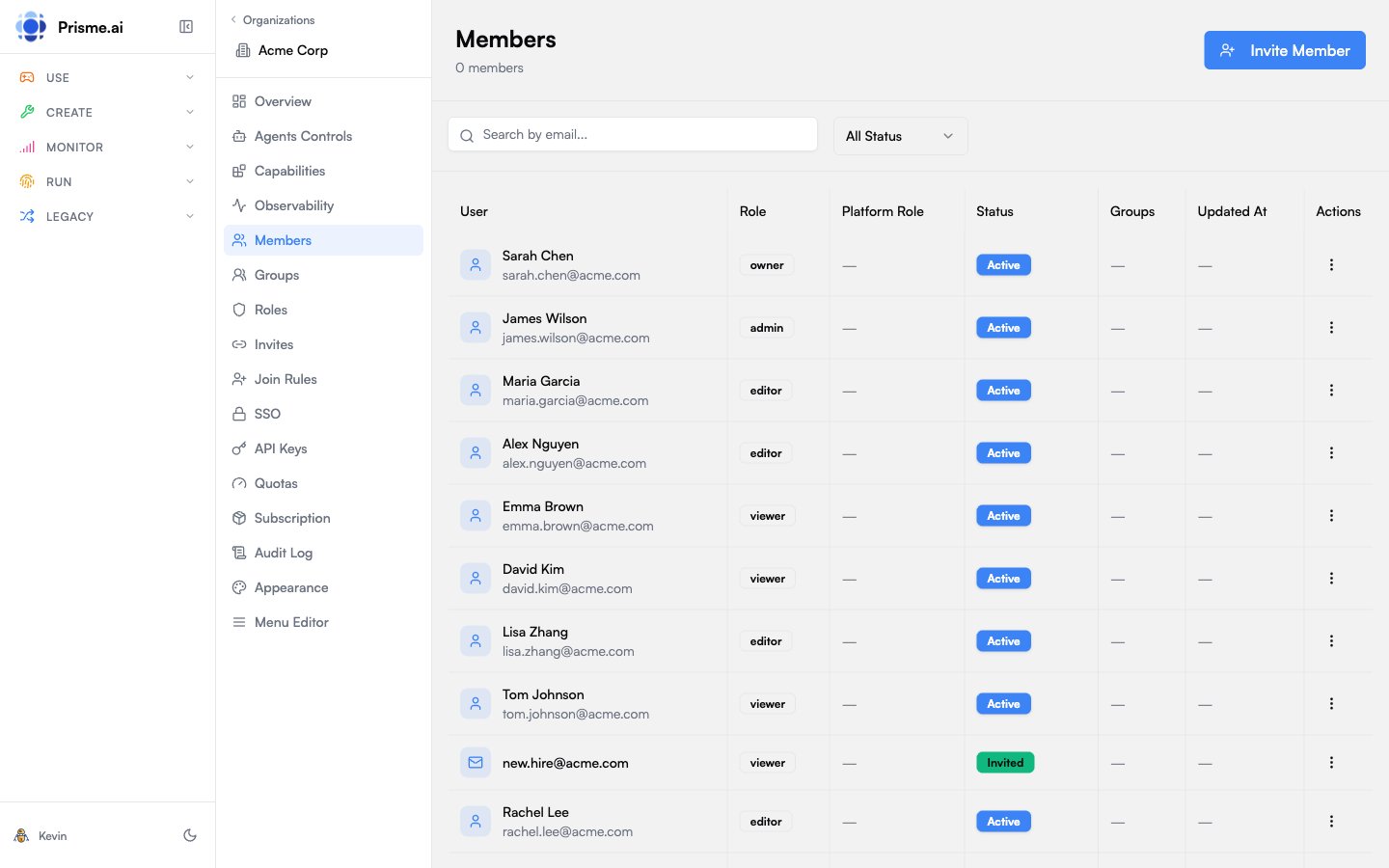 Governe provides comprehensive identity and access management (IAM) for your organization. This includes user management, role-based permissions, SSO configuration, and programmatic access through API keys and service accounts.
## Members
Members are users who belong to your organization. Each member has:
* A **role** that defines their permissions
* Optional **group memberships** for bulk management
* A **status** (active, invited, or suspended)
### Inviting Members
1. Go to **Members** in the sidebar
2. Click **Invite Member**
3. Enter the user's email address
4. Select a role to assign
5. The user receives an invitation email
Invited members appear with "Pending" status until they accept.
### Member Status
| Status | Description |
| ------------- | --------------------------------------- |
| **Active** | Full access based on assigned role |
| **Invited** | Invitation sent, waiting for acceptance |
| **Suspended** | Access temporarily revoked |
### Managing Members
* **Change Role**: Click on a member, select a new role
* **Suspend**: Temporarily disable access without removing membership
* **Remove**: Permanently remove from the organization
## Roles & Permissions
Roles define what actions members can perform. Each role contains a set of permissions.
### Permission Format
Permissions follow a hierarchical `product:resource:action` pattern with wildcard support:
| Product | Key | Example Permissions |
| ------------------- | ------------------ | ----------------------------------------------------------------------------------------------------------------------------------------------------------------------------------------------------------------------------------------- |
| Organization | `orgs` | `orgs:members:manage`, `orgs:groups:read`, `orgs:apikeys:create`, `orgs:branding:update`, `orgs:sso:manage`, `orgs:service-accounts:manage`, `orgs:navigation:manage`, `orgs:invites:manage`, `orgs:join-rules:manage`, `orgs:roles:read` |
| Users (Platform) | `users` | `users:read`, `users:update`, `users:delete`, `users:manage` |
| LLM | `llm` | `llm:completions:use`, `llm:embeddings:use`, `llm:governance:manage` |
| Tools | `tools` | `tools:web_search`, `tools:knowledge_search`, `tools:code_execution`, `tools:api_call` |
| Agents | `agent-factory` | `agent-factory:agents:read`, `agent-factory:agents:write`, `agent-factory:agents:delete`, `agent-factory:agents:publish`, `agent-factory:agents:share`, `agent-factory:agents:explore` |
| Storage / Knowledge | `storage` | `storage:vector_stores:read/write/share/delete`, `storage:files:read/write/delete`, `storage:skills:read/write/delete` |
| Chat | `secure-chat` | `secure-chat:*` |
| Builder | `builder` | `builder:*` |
| Governe | `ai-governance-v2` | `ai-governance-v2:observability:read`, `ai-governance-v2:observability_platform:read`, `ai-governance-v2:announcements:write` |
| Insights | `insights` | `insights:*` |
| Engage | `engage` | `engage:*` |
| Collections | `collections` | `collections:*` |
Wildcards are supported at any level: `orgs:members:*` grants all member actions, `storage:*` grants all storage permissions, `*` grants everything.
### Resource Scopes
Scopes restrict **which specific resources** a role can access, independent of permissions. They use the format `product:resource:id`:
```json theme={null}
{
"scopes": [
"agent-factory:agents:agent_abc123",
"storage:vector_stores:kb_xyz",
"llm:models:gpt-4o"
]
}
```
* `*` grants access to all resources
* `agent-factory:agents:*` grants access to all agents
* Empty or omitted scopes mean no resources are accessible
Scopes are available on both roles and [API keys](#api-keys).
### Built-in Roles
Organizations come with system roles that cannot be deleted:
| Role | Slug | Permissions | Scopes | Description |
| ------------------ | ---------------- | -------------------------------------------------------------------------------------------------------------------------------------------------------------------------------------------------------------------------------------------------------------------------------------------------------------------- | ------ | --------------------------------------------------- |
| **Owner** | `org:owner` | `*` | `*` | Full organization management. Cannot be overridden. |
| **Admin** | `org:admin` | `orgs:members:manage`, `orgs:groups:manage`, `orgs:branding:manage`, `orgs:navigation:manage`, `orgs:invites:manage`, `orgs:join-rules:manage`, `orgs:apikeys:manage`, `users:manage`, `secure-chat:*`, `agent-factory:*`, `builder:*`, `engage:*`, `storage:*`, `collections:*`, `insights:*`, `ai-governance-v2:*` | `*` | Organization administration |
| **Member** | `org:member` | `orgs:roles:read`, `users:read`, `orgs:groups:read`, `orgs:members:read`, `agent-factory:agents:read`, `agent-factory:agents:explore`, `storage:vector_stores:read`, `storage:files:read`, `storage:skills:read`, `secure-chat:*` | — | Basic organization member |
| **Agent Maker** | `agent-maker` | Member base + `agent-factory:*`, `storage:*`, `knowledge:*` | `*` | Full agent-factory & knowledge access |
| **Builder** | `builder` | Agent Maker + `builder:*` | `*` | Builder + agent-factory + knowledge access |
| **Agent Standard** | `agent-standard` | `llm:*`, `tools:*` | — | Default agent role (for service accounts) |
All system roles except `owner` can be customized per organization. When an admin edits a system role in the Governe UI, a custom role override is saved for that organization that fully replaces the system definition.
### Creating Custom Roles
1. Go to **Roles** in the sidebar
2. Click **Create Role**
3. Enter name and description
4. Select permissions using the **Permission Tree Editor**
The role editor displays permissions as a hierarchical tree organized by product > resource > action:
* Checking a **product** node sets the product-level wildcard (e.g. `storage:*`)
* Checking a **resource** node sets the resource-level wildcard (e.g. `storage:vector_stores:*`)
* Individual actions can be toggled independently
* For products supporting instance scoping, a **Scopes** section appears under each resource, allowing admins to set the "All resources" wildcard or add specific resource IDs
## Groups
Groups organize members for easier bulk management. Use cases include:
* Department-based access (Engineering, Marketing)
* Project teams with shared permissions
* Geographic regions
### Creating Groups
1. Go to **Groups** in the sidebar
2. Click **Create Group**
3. Enter name, slug, and optional description
4. Add members to the group
### Using Groups with Join Rules
Groups work with [Join Rules](#join-rules) to automatically add new users to the right groups based on their attributes.
## SSO Configuration
Configure Single Sign-On with your corporate identity provider.
### Supported Providers
| Type | Examples |
| -------- | --------------------------------------- |
| **OIDC** | Google Workspace, Azure AD, Okta, Auth0 |
| **SAML** | Azure AD, Okta, OneLogin, ADFS |
### SSO Config Structure
SSO configuration is stored as part of the organization object (`ssoConfig` field):
| Field | Type | Description |
| ------------------------ | --------- | ----------------------------------------------------------- |
| `enabled` | boolean | Whether SSO is active |
| `domains` | string\[] | Email domains that trigger SSO (must be unique across orgs) |
| `provider.type` | string | `saml` or `oidc` |
| `provider.saml` | object | SAML config: `entryPoint`, `issuer`, `cert` |
| `provider.oidc` | object | OIDC config: `issuer`, `clientId`, `clientSecret` |
| `settings.enforceSSO` | boolean | Require SSO (disable local auth) |
| `settings.autoProvision` | boolean | Auto-create accounts for new SSO users |
| `settings.defaultRole` | string | Role assigned to auto-provisioned users |
| `settings.allowedRoles` | string\[] | Roles that SSO users can be assigned |
### Adding an OIDC Provider
1. Go to **SSO** in the sidebar
2. Click **Add Provider**
3. Select **OIDC**
4. Enter configuration:
| Field | Description |
| ----------------- | ------------------------------ |
| **Issuer** | Your IdP's issuer URL |
| **Client ID** | OAuth client ID from your IdP |
| **Client Secret** | OAuth client secret |
| **Scopes** | Usually `openid profile email` |
5. Configure **attribute mapping** to map IdP claims to user fields
6. Optionally restrict to specific **domains** (e.g., `@acme.com`)
7. Enable the provider
Works with Azure AD, Okta, Google Workspace, or any OIDC-compliant provider.
### Adding a SAML Provider
1. Go to **SSO** in the sidebar
2. Click **Add Provider**
3. Select **SAML**
4. Enter configuration:
| Field | Description |
| --------------- | -------------------------------------- |
| **Entry Point** | IdP's SSO URL |
| **Certificate** | IdP's signing certificate (PEM format) |
| **Audience** | Service Provider entity ID |
5. Download the SP metadata to configure your IdP
6. Enable the provider
### Domain Validation
When updating SSO config, the system validates that domains are not already claimed by another organization. If a domain conflict is found, the update is rejected with a `DOMAIN_ALREADY_USED` error.
### Secrets Encryption
SSO provider secrets (OIDC `clientSecret`, SAML certificates) are encrypted at rest using **envelope encryption** (`@prisme.ai/secrets`) when the `SECRETS_MASTER_KEYS` environment variable is configured:
* A per-organization **Data Encryption Key (DEK)** encrypts the SSO config
* The DEK is wrapped by a platform-level **Key Encryption Key (KEK)** using AES-256-GCM
* Wrapped DEKs are stored in MongoDB alongside the org; plaintext secrets are never persisted
If `SECRETS_MASTER_KEYS` is not configured, SSO configs are stored in plaintext.
## Join Rules
Join rules allow automatic organization membership based on user attributes. Rules are evaluated dynamically and can assign both a role and group memberships.
### Rule Structure
Each join rule contains an array of conditions with AND logic — all conditions in a rule must match:
```json theme={null}
{
"rules": [
{ "field": "email", "operator": "endsWith", "value": "@acme.com" },
{ "field": "authData.google.hd", "operator": "equals", "value": "acme.com" }
],
"role": "member",
"groups": ["engineering", "default-access"]
}
```
An organization can have multiple join rules — they use OR logic between entries (only one rule needs to match).
### Condition Fields
| Field | Type | Description |
| ---------- | ------ | -------------------------------------------------------------------------------------------- |
| `field` | string | Dot-notation path on the user object (e.g. `email`, `authData.google.hd`, `meta.department`) |
| `operator` | string | `equals`, `startsWith`, or `endsWith` (case-insensitive) |
| `value` | string | The value to match against |
### Creating a Join Rule
1. Go to **Join Rules** in the sidebar
2. Click **Add Rule**
3. Define conditions
4. Select the role to assign
5. Optionally select groups to add the user to
### Rule Evaluation
Join rules are evaluated on every `/me` API call (the first call the platform makes after authentication). A per-user version cache ensures rules are only re-evaluated when they change:
1. Each org's join rules have a version counter (incremented when rules are updated)
2. The gateway tracks which version was last evaluated for each user
3. If the version matches, evaluation is skipped for that org
### Re-evaluation on Rule Changes
When an organization's join rules are updated, the platform re-evaluates all existing members who joined via join rules:
* Members who **no longer match** any rule are automatically removed from the organization
* New users who now match are **not** retroactively added — they join on their next `/me` call
* Re-evaluation processes members in batches of 500
## Joining Organizations — Comparison
There are four mechanisms for users to join an organization:
| Mechanism | Trigger | Role | Groups | Re-evaluation |
| ------------- | ------------------ | ----------------- | --------------- | ---------------------------------- |
| SSO auto-join | SSO login | `defaultRole` | No | One-time |
| Join rules | Every `/me` call | Rule's `role` | Rule's `groups` | Yes (removed if no longer matches) |
| Invite code | User redeems link | Code's `roleSlug` | No | No |
| Email invite | First login/signup | Admin-chosen role | No | No |
## Invitation Codes
Invitation codes let you share a link that grants access to your organization.
### Creating an Invite
1. Go to **Invites** in the sidebar
2. Click **Generate Invite**
3. Configure:
* **Role**: What role invitees receive
* **Max Uses**: Limit how many times the code can be used (optional)
* **Expiration**: When the code expires (optional)
4. Share the generated link
### Invite Status
| Status | Description |
| ------------- | -------------------- |
| **Active** | Can still be used |
| **Expired** | Past expiration date |
| **Exhausted** | Reached max uses |
| **Revoked** | Manually disabled |
## API Keys
API keys (`iak_*`) enable programmatic access to the Prisme.ai platform from external systems. They are scoped to an organization and carry specific permissions and resource scopes.
### Key Format
All API keys use the format `iak_{orgSlug}_{uuid}`:
```
iak_acme-corp_a1b2c3d4e5f6g7h8...
```
The embedded `orgSlug` allows the auth middleware to resolve the organization without a database lookup. Keys are stored **hashed** — the plaintext key is returned only once at creation time.
### Creating an API Key
1. Go to **API Keys** in the sidebar
2. Click **Create API Key**
3. Enter a name
4. Select permissions using the Permission Tree (same `product:resource:action` format as roles)
5. Optionally set **scopes** to restrict to specific resources (e.g., `agent-factory:agents:agent-abc-123`)
6. Set an expiration date if needed
The API key is only shown once when created. Store it securely.
### Scopes
Scopes restrict **which resources** a key can access, even if the permission allows the action. They use the same `product:resource:id` format as [role scopes](#resource-scopes):
```json theme={null}
{
"scopes": [
"agent-factory:agents:agent-abc-123",
"llm:models:gpt-4o",
"storage:vector_stores:kb_xyz"
]
}
```
Wildcards are supported: `agent-factory:agents:*` grants access to all agents, `*` grants access to all resources.
### Using API Keys
Include the key in the `x-prismeai-api-key` header:
```bash theme={null}
curl -H "x-prismeai-api-key: iak_acme-corp_a1b2c3d4..." \
https://api.prisme.ai/v1/completions
```
### How API Key Validation Works
API key validation is handled natively by the platform runtime. When a request includes an `iak_*` key, the runtime resolves the organization, permissions, and scopes, then injects them into the standard `run.permissions` and `run.scopes` variables — the same variables used for user session auth. No cross-workspace HTTP call is needed.
### Rotating Keys
1. Click on an API key
2. Click **Rotate**
3. A new key is generated with zero downtime — the old key is immediately invalidated
## Service Accounts
Service accounts are non-human identities for machine-to-machine authentication. Use them for:
* CI/CD pipelines
* Backend integrations
* Automated workflows
* Scheduled tasks
### Creating a Service Account
1. Go to **Agents Controls > Service Accounts**
2. Click **Create Service Account**
3. Enter:
* **Slug**: URL-safe identifier
* **Name**: Display name
* **Role**: Permission set to assign
4. Copy the generated **client secret**
The client secret is only shown once. Store it securely.
### Authenticating as a Service Account
Exchange the client credentials for an access token:
```bash theme={null}
curl -X POST https://api.prisme.ai/oauth/token \
-d "grant_type=client_credentials" \
-d "client_id=SERVICE_ACCOUNT_ID" \
-d "client_secret=CLIENT_SECRET"
```
### Managing Service Accounts
* **Enable/Disable**: Toggle access without deleting
* **View Last Used**: See when the account last authenticated
* **Rotate Secret**: Generate a new client secret
## Best Practices
Grant only the minimum permissions needed for each role
Organize members into groups for easier permission management
Regularly rotate API keys and service account secrets
Review audit logs to monitor permission changes
Automate onboarding with join rules for consistent access
Set expiration dates on invitation codes
Governe provides comprehensive identity and access management (IAM) for your organization. This includes user management, role-based permissions, SSO configuration, and programmatic access through API keys and service accounts.
## Members
Members are users who belong to your organization. Each member has:
* A **role** that defines their permissions
* Optional **group memberships** for bulk management
* A **status** (active, invited, or suspended)
### Inviting Members
1. Go to **Members** in the sidebar
2. Click **Invite Member**
3. Enter the user's email address
4. Select a role to assign
5. The user receives an invitation email
Invited members appear with "Pending" status until they accept.
### Member Status
| Status | Description |
| ------------- | --------------------------------------- |
| **Active** | Full access based on assigned role |
| **Invited** | Invitation sent, waiting for acceptance |
| **Suspended** | Access temporarily revoked |
### Managing Members
* **Change Role**: Click on a member, select a new role
* **Suspend**: Temporarily disable access without removing membership
* **Remove**: Permanently remove from the organization
## Roles & Permissions
Roles define what actions members can perform. Each role contains a set of permissions.
### Permission Format
Permissions follow a hierarchical `product:resource:action` pattern with wildcard support:
| Product | Key | Example Permissions |
| ------------------- | ------------------ | ----------------------------------------------------------------------------------------------------------------------------------------------------------------------------------------------------------------------------------------- |
| Organization | `orgs` | `orgs:members:manage`, `orgs:groups:read`, `orgs:apikeys:create`, `orgs:branding:update`, `orgs:sso:manage`, `orgs:service-accounts:manage`, `orgs:navigation:manage`, `orgs:invites:manage`, `orgs:join-rules:manage`, `orgs:roles:read` |
| Users (Platform) | `users` | `users:read`, `users:update`, `users:delete`, `users:manage` |
| LLM | `llm` | `llm:completions:use`, `llm:embeddings:use`, `llm:governance:manage` |
| Tools | `tools` | `tools:web_search`, `tools:knowledge_search`, `tools:code_execution`, `tools:api_call` |
| Agents | `agent-factory` | `agent-factory:agents:read`, `agent-factory:agents:write`, `agent-factory:agents:delete`, `agent-factory:agents:publish`, `agent-factory:agents:share`, `agent-factory:agents:explore` |
| Storage / Knowledge | `storage` | `storage:vector_stores:read/write/share/delete`, `storage:files:read/write/delete`, `storage:skills:read/write/delete` |
| Chat | `secure-chat` | `secure-chat:*` |
| Builder | `builder` | `builder:*` |
| Governe | `ai-governance-v2` | `ai-governance-v2:observability:read`, `ai-governance-v2:observability_platform:read`, `ai-governance-v2:announcements:write` |
| Insights | `insights` | `insights:*` |
| Engage | `engage` | `engage:*` |
| Collections | `collections` | `collections:*` |
Wildcards are supported at any level: `orgs:members:*` grants all member actions, `storage:*` grants all storage permissions, `*` grants everything.
### Resource Scopes
Scopes restrict **which specific resources** a role can access, independent of permissions. They use the format `product:resource:id`:
```json theme={null}
{
"scopes": [
"agent-factory:agents:agent_abc123",
"storage:vector_stores:kb_xyz",
"llm:models:gpt-4o"
]
}
```
* `*` grants access to all resources
* `agent-factory:agents:*` grants access to all agents
* Empty or omitted scopes mean no resources are accessible
Scopes are available on both roles and [API keys](#api-keys).
### Built-in Roles
Organizations come with system roles that cannot be deleted:
| Role | Slug | Permissions | Scopes | Description |
| ------------------ | ---------------- | -------------------------------------------------------------------------------------------------------------------------------------------------------------------------------------------------------------------------------------------------------------------------------------------------------------------- | ------ | --------------------------------------------------- |
| **Owner** | `org:owner` | `*` | `*` | Full organization management. Cannot be overridden. |
| **Admin** | `org:admin` | `orgs:members:manage`, `orgs:groups:manage`, `orgs:branding:manage`, `orgs:navigation:manage`, `orgs:invites:manage`, `orgs:join-rules:manage`, `orgs:apikeys:manage`, `users:manage`, `secure-chat:*`, `agent-factory:*`, `builder:*`, `engage:*`, `storage:*`, `collections:*`, `insights:*`, `ai-governance-v2:*` | `*` | Organization administration |
| **Member** | `org:member` | `orgs:roles:read`, `users:read`, `orgs:groups:read`, `orgs:members:read`, `agent-factory:agents:read`, `agent-factory:agents:explore`, `storage:vector_stores:read`, `storage:files:read`, `storage:skills:read`, `secure-chat:*` | — | Basic organization member |
| **Agent Maker** | `agent-maker` | Member base + `agent-factory:*`, `storage:*`, `knowledge:*` | `*` | Full agent-factory & knowledge access |
| **Builder** | `builder` | Agent Maker + `builder:*` | `*` | Builder + agent-factory + knowledge access |
| **Agent Standard** | `agent-standard` | `llm:*`, `tools:*` | — | Default agent role (for service accounts) |
All system roles except `owner` can be customized per organization. When an admin edits a system role in the Governe UI, a custom role override is saved for that organization that fully replaces the system definition.
### Creating Custom Roles
1. Go to **Roles** in the sidebar
2. Click **Create Role**
3. Enter name and description
4. Select permissions using the **Permission Tree Editor**
The role editor displays permissions as a hierarchical tree organized by product > resource > action:
* Checking a **product** node sets the product-level wildcard (e.g. `storage:*`)
* Checking a **resource** node sets the resource-level wildcard (e.g. `storage:vector_stores:*`)
* Individual actions can be toggled independently
* For products supporting instance scoping, a **Scopes** section appears under each resource, allowing admins to set the "All resources" wildcard or add specific resource IDs
## Groups
Groups organize members for easier bulk management. Use cases include:
* Department-based access (Engineering, Marketing)
* Project teams with shared permissions
* Geographic regions
### Creating Groups
1. Go to **Groups** in the sidebar
2. Click **Create Group**
3. Enter name, slug, and optional description
4. Add members to the group
### Using Groups with Join Rules
Groups work with [Join Rules](#join-rules) to automatically add new users to the right groups based on their attributes.
## SSO Configuration
Configure Single Sign-On with your corporate identity provider.
### Supported Providers
| Type | Examples |
| -------- | --------------------------------------- |
| **OIDC** | Google Workspace, Azure AD, Okta, Auth0 |
| **SAML** | Azure AD, Okta, OneLogin, ADFS |
### SSO Config Structure
SSO configuration is stored as part of the organization object (`ssoConfig` field):
| Field | Type | Description |
| ------------------------ | --------- | ----------------------------------------------------------- |
| `enabled` | boolean | Whether SSO is active |
| `domains` | string\[] | Email domains that trigger SSO (must be unique across orgs) |
| `provider.type` | string | `saml` or `oidc` |
| `provider.saml` | object | SAML config: `entryPoint`, `issuer`, `cert` |
| `provider.oidc` | object | OIDC config: `issuer`, `clientId`, `clientSecret` |
| `settings.enforceSSO` | boolean | Require SSO (disable local auth) |
| `settings.autoProvision` | boolean | Auto-create accounts for new SSO users |
| `settings.defaultRole` | string | Role assigned to auto-provisioned users |
| `settings.allowedRoles` | string\[] | Roles that SSO users can be assigned |
### Adding an OIDC Provider
1. Go to **SSO** in the sidebar
2. Click **Add Provider**
3. Select **OIDC**
4. Enter configuration:
| Field | Description |
| ----------------- | ------------------------------ |
| **Issuer** | Your IdP's issuer URL |
| **Client ID** | OAuth client ID from your IdP |
| **Client Secret** | OAuth client secret |
| **Scopes** | Usually `openid profile email` |
5. Configure **attribute mapping** to map IdP claims to user fields
6. Optionally restrict to specific **domains** (e.g., `@acme.com`)
7. Enable the provider
Works with Azure AD, Okta, Google Workspace, or any OIDC-compliant provider.
### Adding a SAML Provider
1. Go to **SSO** in the sidebar
2. Click **Add Provider**
3. Select **SAML**
4. Enter configuration:
| Field | Description |
| --------------- | -------------------------------------- |
| **Entry Point** | IdP's SSO URL |
| **Certificate** | IdP's signing certificate (PEM format) |
| **Audience** | Service Provider entity ID |
5. Download the SP metadata to configure your IdP
6. Enable the provider
### Domain Validation
When updating SSO config, the system validates that domains are not already claimed by another organization. If a domain conflict is found, the update is rejected with a `DOMAIN_ALREADY_USED` error.
### Secrets Encryption
SSO provider secrets (OIDC `clientSecret`, SAML certificates) are encrypted at rest using **envelope encryption** (`@prisme.ai/secrets`) when the `SECRETS_MASTER_KEYS` environment variable is configured:
* A per-organization **Data Encryption Key (DEK)** encrypts the SSO config
* The DEK is wrapped by a platform-level **Key Encryption Key (KEK)** using AES-256-GCM
* Wrapped DEKs are stored in MongoDB alongside the org; plaintext secrets are never persisted
If `SECRETS_MASTER_KEYS` is not configured, SSO configs are stored in plaintext.
## Join Rules
Join rules allow automatic organization membership based on user attributes. Rules are evaluated dynamically and can assign both a role and group memberships.
### Rule Structure
Each join rule contains an array of conditions with AND logic — all conditions in a rule must match:
```json theme={null}
{
"rules": [
{ "field": "email", "operator": "endsWith", "value": "@acme.com" },
{ "field": "authData.google.hd", "operator": "equals", "value": "acme.com" }
],
"role": "member",
"groups": ["engineering", "default-access"]
}
```
An organization can have multiple join rules — they use OR logic between entries (only one rule needs to match).
### Condition Fields
| Field | Type | Description |
| ---------- | ------ | -------------------------------------------------------------------------------------------- |
| `field` | string | Dot-notation path on the user object (e.g. `email`, `authData.google.hd`, `meta.department`) |
| `operator` | string | `equals`, `startsWith`, or `endsWith` (case-insensitive) |
| `value` | string | The value to match against |
### Creating a Join Rule
1. Go to **Join Rules** in the sidebar
2. Click **Add Rule**
3. Define conditions
4. Select the role to assign
5. Optionally select groups to add the user to
### Rule Evaluation
Join rules are evaluated on every `/me` API call (the first call the platform makes after authentication). A per-user version cache ensures rules are only re-evaluated when they change:
1. Each org's join rules have a version counter (incremented when rules are updated)
2. The gateway tracks which version was last evaluated for each user
3. If the version matches, evaluation is skipped for that org
### Re-evaluation on Rule Changes
When an organization's join rules are updated, the platform re-evaluates all existing members who joined via join rules:
* Members who **no longer match** any rule are automatically removed from the organization
* New users who now match are **not** retroactively added — they join on their next `/me` call
* Re-evaluation processes members in batches of 500
## Joining Organizations — Comparison
There are four mechanisms for users to join an organization:
| Mechanism | Trigger | Role | Groups | Re-evaluation |
| ------------- | ------------------ | ----------------- | --------------- | ---------------------------------- |
| SSO auto-join | SSO login | `defaultRole` | No | One-time |
| Join rules | Every `/me` call | Rule's `role` | Rule's `groups` | Yes (removed if no longer matches) |
| Invite code | User redeems link | Code's `roleSlug` | No | No |
| Email invite | First login/signup | Admin-chosen role | No | No |
## Invitation Codes
Invitation codes let you share a link that grants access to your organization.
### Creating an Invite
1. Go to **Invites** in the sidebar
2. Click **Generate Invite**
3. Configure:
* **Role**: What role invitees receive
* **Max Uses**: Limit how many times the code can be used (optional)
* **Expiration**: When the code expires (optional)
4. Share the generated link
### Invite Status
| Status | Description |
| ------------- | -------------------- |
| **Active** | Can still be used |
| **Expired** | Past expiration date |
| **Exhausted** | Reached max uses |
| **Revoked** | Manually disabled |
## API Keys
API keys (`iak_*`) enable programmatic access to the Prisme.ai platform from external systems. They are scoped to an organization and carry specific permissions and resource scopes.
### Key Format
All API keys use the format `iak_{orgSlug}_{uuid}`:
```
iak_acme-corp_a1b2c3d4e5f6g7h8...
```
The embedded `orgSlug` allows the auth middleware to resolve the organization without a database lookup. Keys are stored **hashed** — the plaintext key is returned only once at creation time.
### Creating an API Key
1. Go to **API Keys** in the sidebar
2. Click **Create API Key**
3. Enter a name
4. Select permissions using the Permission Tree (same `product:resource:action` format as roles)
5. Optionally set **scopes** to restrict to specific resources (e.g., `agent-factory:agents:agent-abc-123`)
6. Set an expiration date if needed
The API key is only shown once when created. Store it securely.
### Scopes
Scopes restrict **which resources** a key can access, even if the permission allows the action. They use the same `product:resource:id` format as [role scopes](#resource-scopes):
```json theme={null}
{
"scopes": [
"agent-factory:agents:agent-abc-123",
"llm:models:gpt-4o",
"storage:vector_stores:kb_xyz"
]
}
```
Wildcards are supported: `agent-factory:agents:*` grants access to all agents, `*` grants access to all resources.
### Using API Keys
Include the key in the `x-prismeai-api-key` header:
```bash theme={null}
curl -H "x-prismeai-api-key: iak_acme-corp_a1b2c3d4..." \
https://api.prisme.ai/v1/completions
```
### How API Key Validation Works
API key validation is handled natively by the platform runtime. When a request includes an `iak_*` key, the runtime resolves the organization, permissions, and scopes, then injects them into the standard `run.permissions` and `run.scopes` variables — the same variables used for user session auth. No cross-workspace HTTP call is needed.
### Rotating Keys
1. Click on an API key
2. Click **Rotate**
3. A new key is generated with zero downtime — the old key is immediately invalidated
## Service Accounts
Service accounts are non-human identities for machine-to-machine authentication. Use them for:
* CI/CD pipelines
* Backend integrations
* Automated workflows
* Scheduled tasks
### Creating a Service Account
1. Go to **Agents Controls > Service Accounts**
2. Click **Create Service Account**
3. Enter:
* **Slug**: URL-safe identifier
* **Name**: Display name
* **Role**: Permission set to assign
4. Copy the generated **client secret**
The client secret is only shown once. Store it securely.
### Authenticating as a Service Account
Exchange the client credentials for an access token:
```bash theme={null}
curl -X POST https://api.prisme.ai/oauth/token \
-d "grant_type=client_credentials" \
-d "client_id=SERVICE_ACCOUNT_ID" \
-d "client_secret=CLIENT_SECRET"
```
### Managing Service Accounts
* **Enable/Disable**: Toggle access without deleting
* **View Last Used**: See when the account last authenticated
* **Rotate Secret**: Generate a new client secret
## Best Practices
Grant only the minimum permissions needed for each role
Organize members into groups for easier permission management
Regularly rotate API keys and service account secrets
Review audit logs to monitor permission changes
Automate onboarding with join rules for consistent access
Set expiration dates on invitation codes